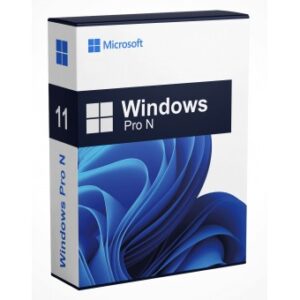

Buy Microsoft Windows 11 Pro License Key Online – Instant Digital Delivery
Activate a genuine Windows 11 Pro license key in under five minutes. DigitalKeyMart delivers authentic retail-grade product keys globally, with no subscription, no recurring fee, and no physical media required.
What Is a Windows 11 Pro License Key?
A Windows 11 Pro license key is a 25-character alphanumeric activation code that unlocks the full Pro edition of Microsoft’s operating system on a single device, permanently. It ties to Microsoft’s activation servers – not to DigitalKeyMart – ensuring lifetime validity.
Windows 11 Pro is the commercial-tier edition of Microsoft’s current OS platform, released in 2021 and receiving continuous feature updates through 2026. The Pro license unlocks capabilities absent in the Home edition: BitLocker device encryption, Windows Sandbox, Hyper-V virtualization, Remote Desktop hosting, and Azure Active Directory domain join. For professionals, developers, and SMB operators, these are operational requirements, not optional extras.
License Types: Retail vs OEM vs Volume
- Retail License – Transferable between devices. If you replace your hardware, you can deactivate and reactivate on a new machine.
- OEM License – Permanently bound to the first device it activates on. Lower price point; zero portability.
- Volume License (MAK/KMS) – Enterprise-grade, multi-seat deployment. Not sold individually here.
DigitalKeyMart sells retail licenses exclusively – the highest portability tier available to individual buyers.
Who Should Buy Windows 11 Pro Instead of Home?
Windows 11 Pro is the correct purchase for anyone who needs enterprise-grade security, virtualization, or remote access. Home edition users who later need BitLocker or Hyper-V must pay Microsoft’s full upgrade price – buying Pro upfront costs less.
Buy Windows 11 Pro If You:
- Run virtual machines for development, testing, or security sandboxing
- Work remotely and need inbound Remote Desktop connections
- Manage business devices joined to an Azure AD or on-premises Active Directory domain
- Handle sensitive client data requiring BitLocker full-disk encryption (mandatory under UK GDPR and US state-level data protection laws as of 2026)
- Deploy containerized workloads via Windows Sandbox without third-party hypervisors
Home edition is sufficient only if you are a casual consumer user with no virtualization, no domain requirement, and no regulatory encryption obligation.
Windows 11 Pro System Requirements in 2026
Windows 11 Pro requires a TPM 2.0 chip, a 64-bit processor at 1 GHz or faster with 2+ cores, 4 GB RAM, and 64 GB storage. Microsoft enforced these requirements at launch and has not relaxed them through 2026 feature updates.
| Requirement | Minimum Specification |
|---|---|
| Processor | 1 GHz, 64-bit, 2+ cores (Intel 8th Gen+ / AMD Zen 2+) |
| RAM | 4 GB minimum |
| Storage | 64 GB |
| TPM | TPM 2.0 (mandatory) |
| Display | 720p, 9″ diagonal minimum |
| Internet | Required for initial setup (Microsoft Account or domain) |
| Firmware | UEFI, Secure Boot capable |
Important – 24H2 Update (2025): Microsoft enforced a Microsoft Account requirement during clean installs on Home edition. Pro edition retains local account setup via domain join flow – a significant advantage for IT administrators managing offline or restricted-network deployments.
How to Activate a Windows 11 Pro License Key – Step by Step
Activation takes under five minutes from key receipt to a fully licensed desktop. No reinstallation is required if Windows 11 is already installed.
Method 1: In-Place Activation (Windows 11 Already Installed)
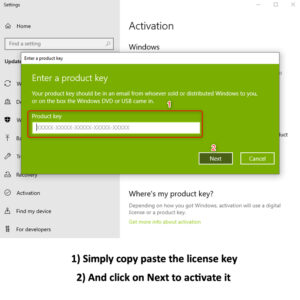
- Open Settings → System → Activation
- Select Change product key
- Enter your 25-character key from DigitalKeyMart
- Click Next — Microsoft’s servers validate and activate instantly
- Confirmation screen reads: “Windows is activated with a digital license”
Method 2: Clean Install Activation
- Download the official Windows 11 ISO from Microsoft’s Media Creation Tool
- Boot from USB
- Enter your product key at the “Activate Windows” screen during setup
- Select Windows 11 Pro when prompted for edition selection
- Complete installation – activation occurs automatically post-setup
Upgrading from Windows 11 Home to Pro
Enter the Pro key directly in the Activation settings panel. Windows downloads the Pro edition components without requiring a reinstall. Total process: approximately 15 minutes including component download.
Buy Windows 11 Pro License Key – Instant Email Delivery
From $XX.XX · Retail License · Lifetime Activation · Delivered in <5 Minutes
- ✅ Genuine retail product key – not OEM, not grey market
- ✅ Transferable between devices – move it when you upgrade hardware
- ✅ Compatible with all 2026 hardware configurations
- ✅ 256-bit encrypted checkout
- ✅ 30-day replacement guarantee
Is Buying a Windows 11 Pro Key from DigitalKeyMart Safe?
DigitalKeyMart operates with PCI-DSS compliant payment processing, SSL-encrypted delivery, and a documented 30-day key replacement policy. Every key is tested against Microsoft’s activation servers before listing.
Trust Signals to Verify on Any Digital Key Seller
- PCI-DSS Level 1 or Level 2 payment compliance – DigitalKeyMart is Level 2
- Dedicated dispute resolution – not just a generic refund policy
- Legitimate key sourcing – retail overstock and volume license resellers within Microsoft’s authorized reseller program
Consumer Rights Protection by Region
United Kingdom: The Consumer Rights Act 2015 applies to digital purchases. Buyers have statutory rights to a replacement or refund if the product key is non-functional at delivery. DigitalKeyMart’s 30-day replacement guarantee meets and exceeds this baseline.
United States: No equivalent federal digital goods statute exists as of 2026. DigitalKeyMart’s policy mirrors UK consumer protections for all customers regardless of geography.
Pre-listing validation: Every key is tested against Microsoft’s KMS and retail activation endpoints before going live. Keys that fail are removed from inventory before sale – not after a customer complaint.
Windows 11 Pro vs. Windows 11 Home: Full Feature Comparison
The Pro edition costs more upfront but eliminates future upgrade fees and unlocks features that Home cannot access at any price without a full edition upgrade.
| Feature | Home | Pro |
|---|---|---|
| BitLocker Encryption | ✗ | ✓ |
| Windows Sandbox | ✗ | ✓ |
| Hyper-V Virtualization | ✗ | ✓ |
| Remote Desktop (Host) | ✗ | ✓ |
| Azure Active Directory Join | ✗ | ✓ |
| Group Policy Editor | ✗ | ✓ |
| Windows Update for Business | ✗ | ✓ |
| Assigned Access (Kiosk Mode) | ✗ | ✓ |
| Microsoft Store | ✓ | ✓ |
| DirectX 12 Ultimate | ✓ | ✓ |
| Auto HDR / DirectStorage | ✓ | ✓ |
Power user note: Group Policy Editor (gpedit.msc) alone justifies the Pro purchase for anyone managing browser policies, software restrictions, or privacy configurations at the system level – a capability Home edition users cannot replicate without third-party tools.
What Happens to Your Windows 11 Pro License When You Upgrade Hardware?
A retail Windows 11 Pro license is fully transferable. Deactivate on the old machine, then activate on the new one – Microsoft’s activation servers track the transfer automatically.
How to Transfer Your License to a New PC
- On the old machine: go to Settings → System → Activation → Troubleshoot → I changed hardware on this device recently
- Unlink the license from your Microsoft Account if it was digitally linked
- On the new machine: enter the same product key in the Activation settings panel
OEM keys cannot be transferred. This is the primary reason DigitalKeyMart recommends retail licenses for any buyer who plans to upgrade hardware within the license’s lifetime.
Frequently Asked Questions – Windows 11 Pro License Key
Will this Windows 11 Pro key work for a clean install or only for upgrades?
The retail key sold by DigitalKeyMart works for both clean installations and in-place upgrades. Enter it during setup or in the Activation panel post-install – both methods are fully supported by Microsoft’s activation infrastructure.
How quickly will I receive my license key after purchase?
Fast Digital Delivery: Your product key is typically delivered via email within 15 minutes of successful payment. While most orders are processed quickly, please allow up to 24 hours for delivery in exceptional cases.
Can I use one Windows 11 Pro key on multiple computers?
No. A single retail license activates one device at a time. If you need multiple seats, contact DigitalKeyMart for volume pricing on multi-key orders.
Is Windows 11 Pro receiving updates through 2026 and beyond?
Yes. Microsoft’s official end-of-support date for Windows 11 is October 2031. As of June 2026, Windows 11 is in the 24H2 update cycle with security patches and feature updates confirmed through at least 2027.
What is the difference between a retail key and an OEM key?
A retail key is portable – transfer it to a new device by deactivating on the old one. An OEM key is permanently tied to the first machine it activates on. If that machine fails or is replaced, the OEM key cannot be reused. DigitalKeyMart sells retail keys exclusively.
Does Windows 11 Pro require an internet connection to stay activated?
No. After initial activation, Windows 11 Pro operates fully offline. Internet is required only for the first activation event and for Windows Update, which can be managed or deferred through Group Policy on the Pro edition.
Do UK buyers have consumer rights protection on this digital purchase?
Yes. The Consumer Rights Act 2015 applies. If your key is non-functional at delivery, you are entitled to a replacement. DigitalKeyMart’s 30-day replacement guarantee aligns with this statutory right and applies globally, including to US customers.
Buy Your Windows 11 Pro License Key Now
DigitalKeyMart delivers a genuine, transferable, lifetime retail license – activated in under five minutes, backed by a 30-day replacement guarantee, and compliant with consumer protection standards in both the US and UK.
Buy Windows 11 Pro – Instant Delivery →
No subscription. No physical media. No waiting. One key, one device, lifetime activation.